Cross-Component Communication in React Without the Overhead
Learn how to use custom browser events for lightweight, decoupled communication between distant React components—no state management library required.
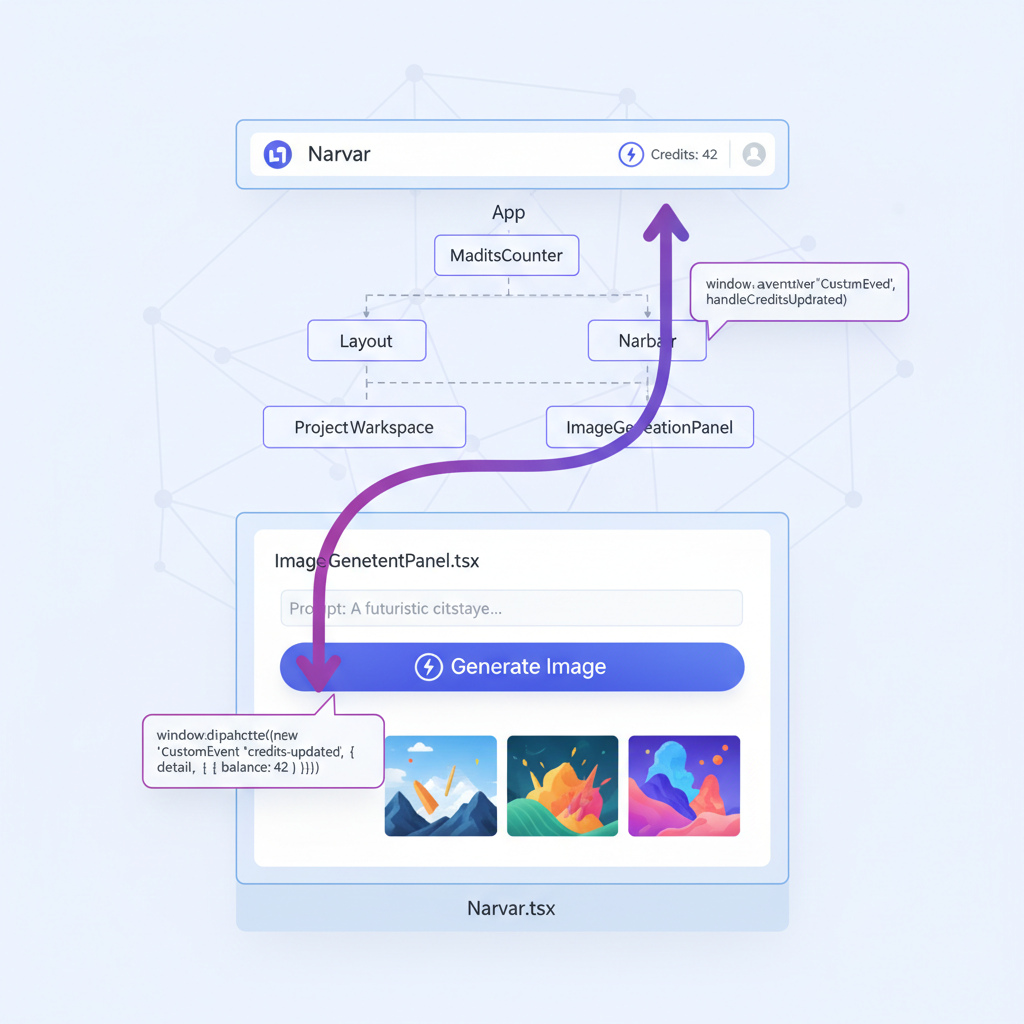
When building React applications, you’ll eventually face a common challenge: how do you update state in one component from another component that lives in a completely different part of your component tree?
The typical solutions—prop drilling, React Context, or state management libraries—each come with trade-offs. But there’s a lightweight pattern that’s often overlooked: custom browser events.
The Problem
Consider a real scenario: you have a credits counter in your navigation bar, and an image generation panel in your main content area. When a user generates an image, credits are deducted on the server, and the API returns the new balance. But how do you update that navbar counter?
App
├── Layout
│   └── Navbar          ← needs to display updated credits
│       └── CreditsCounter
└── MainContent
    └── ProjectWorkspace
        └── ImageGenerationPanel  ← knows when credits change
These components are in completely separate branches of the tree. The ImageGenerationPanel has no direct way to communicate with Navbar.
Click the button below to see how custom events solve this:
Common Solutions and Their Trade-offs
Prop Drilling
Pass a callback function down through every intermediate component. This works but creates tight coupling and clutters components with props they don’t use.
React Context
Create a CreditsContext that both components consume. This is clean but adds complexity—you need a provider, a custom hook, and now every component re-renders when credits change (unless you optimize with useMemo).
State Management Libraries
Zustand, Redux, or Jotai can handle this elegantly. But if this is your only cross-component communication need, you’re adding a dependency for a single use case.
The Custom Event Pattern
Browser custom events offer a surprisingly elegant solution for simple cross-component communication:
// Dispatch an event when credits change
window.dispatchEvent(new CustomEvent('credits-updated', {
  detail: { balance: 42 }
}));

// Listen for the event anywhere else
window.addEventListener('credits-updated', (event) => {
  console.log('New balance:', event.detail.balance);
});
This is the same mechanism browsers use for native events like click or resize. It’s built into every browser, requires no dependencies, and components don’t need to know about each other.
Implementation in React
Here’s how this looks in a real React application:
The Sender Component
After a successful API call that changes the credits balance, dispatch an event:
// ImageGenerationPanel.tsx
const handleGenerate = async () => {
  const response = await fetch('/api/generate-image', {
    method: 'POST',
    body: JSON.stringify({ prompt, model, projectId }),
  });

  const data = await response.json();

  // Notify any listeners that credits have changed
  if (typeof data.remainingCredits === 'number') {
    window.dispatchEvent(new CustomEvent('credits-updated', {
      detail: { balance: data.remainingCredits }
    }));
  }

  // Continue with normal success handling...
  setGeneratedImage(data.imageUrl);
};
The Receiver Component
Set up a listener in a useEffect hook:
// Navbar.tsx
const [creditInfo, setCreditInfo] = useState<CreditInfo | null>(null);

// Fetch initial credits on mount
useEffect(() => {
  async function fetchCredits() {
    const { data } = await supabase
      .from('credit_balances')
      .select('balance, tier, renews_at')
      .single();

    if (data) setCreditInfo(data);
  }
  fetchCredits();
}, []);

// Listen for updates from other components
useEffect(() => {
  const handleCreditsUpdated = (event: CustomEvent<{ balance: number }>) => {
    setCreditInfo(prev => prev ? { ...prev, balance: event.detail.balance } : null);
  };

  window.addEventListener('credits-updated', handleCreditsUpdated as EventListener);

  return () => {
    window.removeEventListener('credits-updated', handleCreditsUpdated as EventListener);
  };
}, []);
The key points:
- Use
CustomEventwith a descriptive name - Pass data through the
detailproperty - Always clean up the listener in the effect’s return function
- TypeScript requires casting to
EventListenerfor custom event types
Type Safety
For better TypeScript support, you can extend the WindowEventMap:
// types/events.ts
declare global {
  interface WindowEventMap {
    'credits-updated': CustomEvent<{ balance: number }>;
  }
}

export {};
Now you can skip the as EventListener cast:
useEffect(() => {
  const handleCreditsUpdated = (event: CustomEvent<{ balance: number }>) => {
    setCreditInfo(prev => prev ? { ...prev, balance: event.detail.balance } : null);
  };

  window.addEventListener('credits-updated', handleCreditsUpdated);
  return () => window.removeEventListener('credits-updated', handleCreditsUpdated);
}, []);
When to Use This Pattern
This pattern shines when:
- Components are in separate branches of the component tree with no common parent (other than the app root)
- The update is simple—a single value or small object, not complex nested state
- It’s a one-way notification—one component tells others “something happened”
- You want zero dependencies—no additional libraries or complex setup
- The communication is infrequent—occasional updates, not rapid-fire state changes
When NOT to Use This Pattern
Reach for Context or a state library instead when:
- Components share a close parent—just lift state up or pass props
- Multiple components need to read AND write shared state—Context or Zustand handles this better
- State is complex or deeply nested—events with large payloads get unwieldy
- You need state persistence—events are ephemeral; use localStorage or URL state
- You’re already using a state library—keep state management consistent
A Word on Testability
Custom events are straightforward to test:
// In your test
it('updates credits when event is dispatched', () => {
  render(<Navbar />);

  // Simulate the event that ImageGenerationPanel would dispatch
  window.dispatchEvent(new CustomEvent('credits-updated', {
    detail: { balance: 100 }
  }));

  expect(screen.getByText('100')).toBeInTheDocument();
});
No mocking of Context providers or store configurations needed.
Conclusion
Custom browser events aren’t a replacement for proper state management, but they’re a useful tool for specific scenarios. When you need lightweight, decoupled communication between distant components, they offer a clean solution with zero dependencies.
The pattern is particularly valuable in applications where:
- You have a global UI element (navbar, toast notifications, status bar) that needs updates from various places
- You want to avoid the complexity of setting up Context for a single piece of state
- Components are truly independent and shouldn’t know about each other’s implementation
Next time you’re about to add a state management library for one cross-component update, consider whether a simple custom event might do the job.